A Live2D model is a folder, not a file. A .moc3 holds the mesh and its deformers. A .model3.json points at everything else. Then textures, usually larger than the model itself, physics, sometimes an expression set.
Letting a merchant drag that folder in and watch a character appear sounded like the easy half of the feature. It took the longest. Almost none of it failed in a way that said so.
Here is what actually stops a model, in the order it meets them.
The core will not read a model that is too new
We load the Cubism Core from its unversioned CDN URL. Unversioned means you get whatever Live2D currently publishes as latest, and you learn which that is at runtime: csmGetLatestMocVersion() returns the highest .moc3 format the core can revive. For us it has been 5.
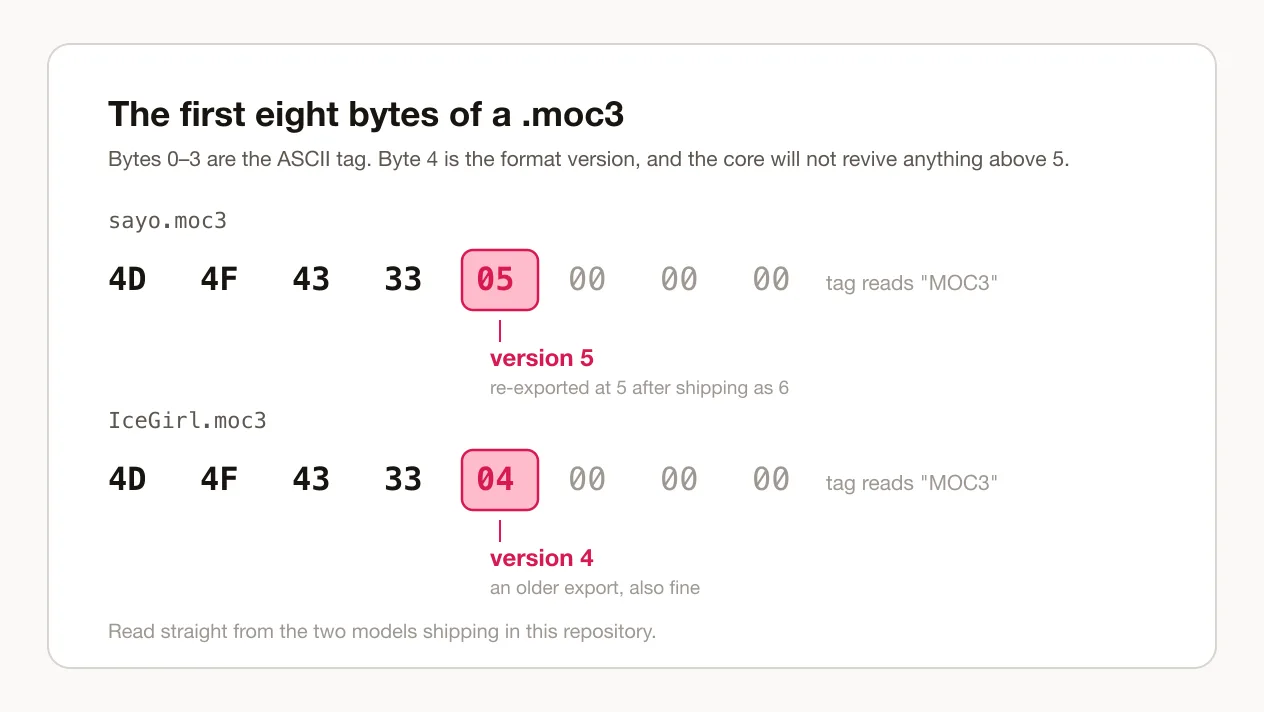
A model exported from a newer Cubism Editor is .moc3 version 6, and Moc.fromArrayBuffer answers it with null. Not a throw. Not a warning. The character slot renders, the canvas initialises, the ticker runs, and nothing is drawn in it.
We shipped one like that. A preset called Sayo went out at v6, showed an empty stage, and was diagnosed only by reading the file itself: the first four bytes of a .moc3 are the ASCII MOC3, and byte four is the version number. Re-exported at v5 it revived on the first try.
The header of two models shipping in this repository. Byte four is the version: five in one, four in the other, and both under the ceiling.
If you are wiring a model of your own, read that byte before you wire anything else. It costs nothing, and it is the likeliest single reason a model is invisible rather than broken.
The upload quietly cut itself in half
The next one appeared only in production, and only for real models.
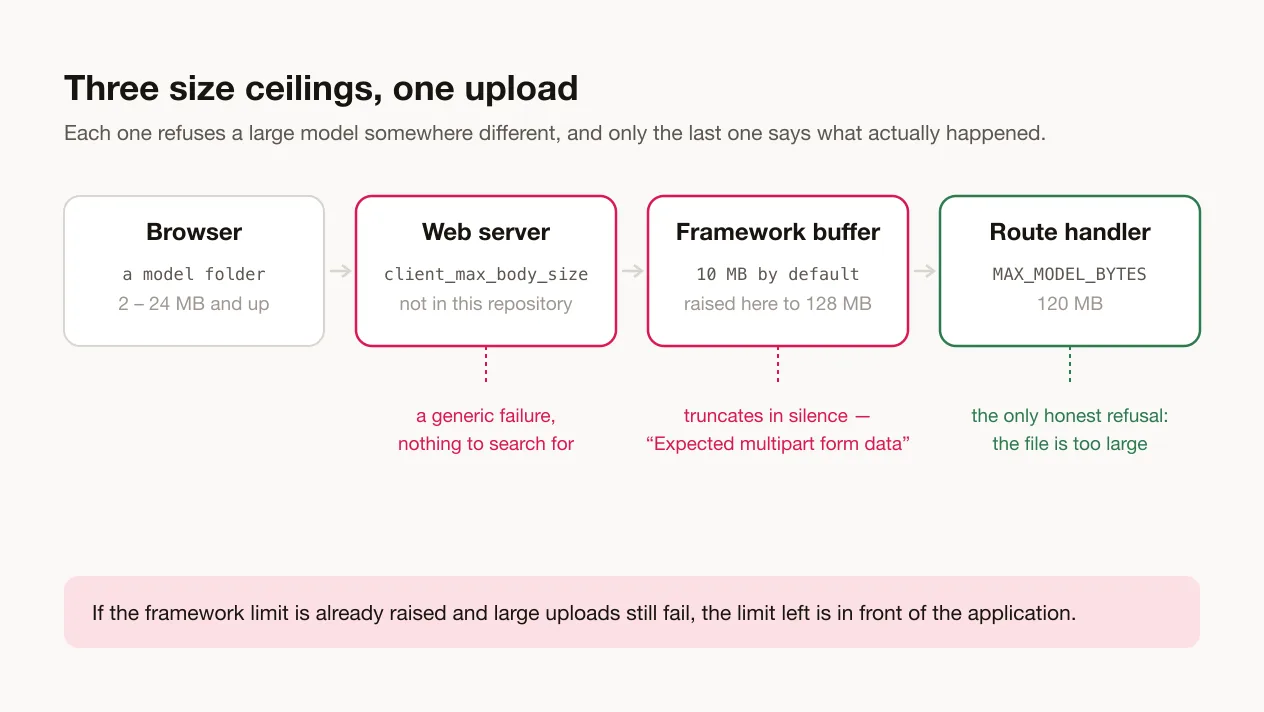
This app ships a proxy, which makes the framework buffer each request body so it can be read more than once. That buffer has a default ceiling of 10 MB. Past the ceiling it does not raise anything. It truncates, and hands the route a partial body.
The route then reports that it expected multipart form data. True, and useless. The form data was intact when it left the browser. Model folders run from about 2 MB to well over 20, so they tripped it every time, while background images, all comfortably under 10 MB, never did once. An upload path that works for one kind of file and fails for another with a parser error is an excellent way to spend a day reading the parser.
The repair is a single line of configuration raising that buffer to 128 MB, deliberately set just above the route's own 120 MB limit so that the route's limit is the one that gets to speak.
The other ceiling
There is a second ceiling, and it is not in the repository at all. It belongs to the same family as the three in the ceilings a character runs into on a storefront: a limit somebody else set, which does not announce itself when you reach it. The web server in front of the application has its own maximum body size. If that is lower than the route's limit, a large model is refused before the application is ever reached.
The two are worth telling apart. The framework truncation gives you the multipart complaint. The server refusal gives you a generic failure with nothing distinctive to search for. So: if the framework limit has already been raised and large uploads still fail, the remaining limit is in front of the application rather than inside it.
Where a large model can be refused, and what each layer says when it does.
One file from the operating system failed the whole folder
The validator used to reject an entire upload on the first file it did not recognise. Every folder chosen through a Mac file picker carries a .DS_Store. Plenty of model folders also carry a readme, or a stray configuration file left behind by another tool.
It filters now instead of refusing: it keeps .json, .moc3 and .png and drops the rest without comment. The real question — is this a model at all? — is answered by whether a model manifest is present, and that is the only check allowed to fail the upload.
A promise that never settled
The last one taught us the most.
After an upload we render a single frame of the model to cut a thumbnail from. That render had no timeout. On a slow or very large model it simply never finished, and because the promise never settled, the value waiting downstream stayed undefined instead of becoming null.
That distinction decided the entire bug. A thrown error would have been caught, turned into null, and the icon cropper would have opened with its manual fallback — the path was already there. A promise that never settles produces no error to catch, no branch to take, and nothing in the console. The dialog simply sat still.
It is bounded at eight seconds now, and the timeout resolves to null rather than rejecting, so it arrives in the branch that already existed.
If you are about to do this
Check the version byte first. It takes a hex viewer and about four seconds, and it rules out the failure that looks the most like a rendering problem and is the least like one.
Then upload something big on purpose, before you need to. Somewhere between the browser and your route handler there are two or three size limits you did not set, and the day you find out which one is lowest should not be the day a merchant is watching.
The rendering itself was never the hard part. The library does that. What cost us the weeks was five different ways for a model to arrive incomplete, only one of which said so.
If you do not have a rigged model to upload in the first place, none of this is your problem yet: one drawing and three marks is the other way into a character, and it fails in completely different places.